![owl-Logo-1.png]](https://help.lendingwise.com/hs-fs/hubfs/owl-Logo-1.png?width=43&height=46&name=owl-Logo-1.png)
Where to find it: in Loan Origination > Pipeline - Main, click the green folder icon on the file's row, then click Action History in the More Actions panel.
Action History is a detailed record of every action taken on a loan file.
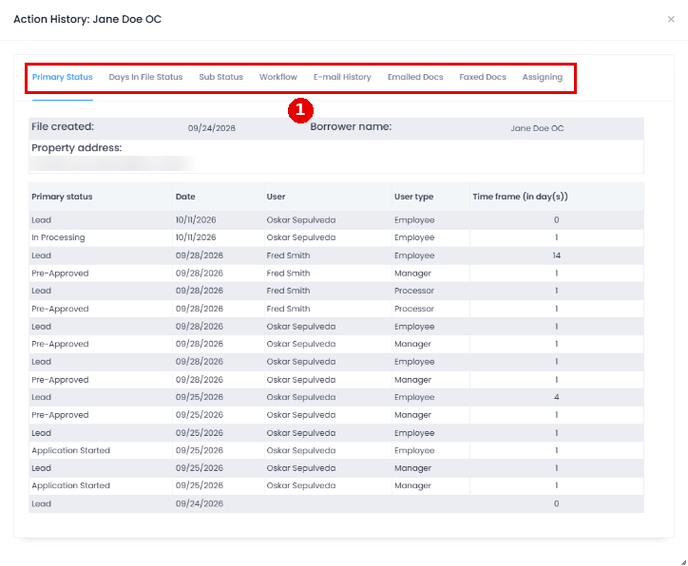
Action History is organized into several tabs, each offering in-depth information on various aspects of a loan file:
- Primary Status tab: This tab displays file creation details, borrower name, property address, and a history of primary file status changes. It includes the date, user responsible for the change, user type, and time frame in days for each status change.
- Days In File Status tab: This tab shows the total number of days the file has spent in each primary status. It adds up the time frames from the Primary Status tab, so a file that went back to a status more than once shows the combined total.
- Substatus tab: This tab shows all checked sub-statuses, the dates they were checked or unchecked, the user responsible for the change, user type, and time frame in days.
- Workflow tab: This tab lists workflow steps that have been checked, along with the user responsible for the change, user type, and the date the change was made.
- E-Mail History tab: This tab provides an overview of any email history related to the loan file.
- Emailed Docs tab: This tab displays the names of documents from the loan file that were emailed, along with the date, sender, sender's user type, and recipient.
- Faxed Docs tab: This tab shows the names of documents from the loan file that were faxed, along with the date, sender, sender's user type, and recipient.
- Assigning tab: This tab presents a history of employees assigned to the loan file, including the date they were assigned.
Incorporating Action History into your loan management process is crucial for several reasons:
- Ensures transparency and accountability among team members
- Facilitates efficient collaboration and communication
- Improves customer service by providing quick access to loan file details Assists in maintaining regulatory compliance and simplifying auditing processes
- Enhances problem-solving capabilities by offering a clear record of actions taken
By leveraging the Action History feature in LendingWise, users can streamline their loan processing, improve team collaboration, and ultimately provide a superior experience for borrowers.