![owl-Logo-1.png]](https://help.lendingwise.com/hs-fs/hubfs/owl-Logo-1.png?width=43&height=46&name=owl-Logo-1.png)
LendingWise can import and export loan files in Fannie Mae 3.4 (MISMO 3.4 XML) format, and it can generate the 1003 loan application.
Import a Fannie Mae 3.4 file
- Make sure your file is in Fannie Mae 3.4 XML format. Fannie Mae no longer supports the 3.2 format, and it can't be imported.
- Go to Settings > Platform Settings > Form Fields and check that every field you want filled in is turned on. The import only fills fields that are turned on.
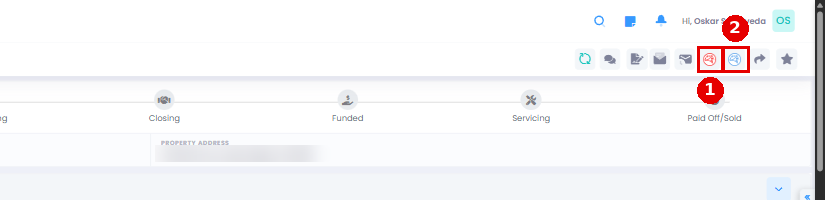
- Open the loan file and click the Fannie Mae 3.4 Import icon in the file header. It opens a file picker for your .xml file.
Note: if a field is missing after the import, check that it's turned on in Form Fields, then import again.
You can download official Fannie Mae 3.4 test files from the Fannie Mae Single-Family Technology Solutions page.
Export a Fannie Mae 3.4 file
Open the loan file and click the Fannie Mae 3.4 Export icon in the file header. The .xml file downloads right away with no message on the page, so check your Downloads folder. Then upload it to the system you're sending it to.
Note: if the receiving system shows import errors, troubleshoot there first. Common causes are a field that wasn't exported from LendingWise or a field that wasn't mapped correctly.
The 1003 loan application
You can export Fannie Mae's updated 1003 loan application (Form 1003), the MISMO 3.4 export and other formats.
Export options:
Sample Fannie Mae 1003 document (PDF)
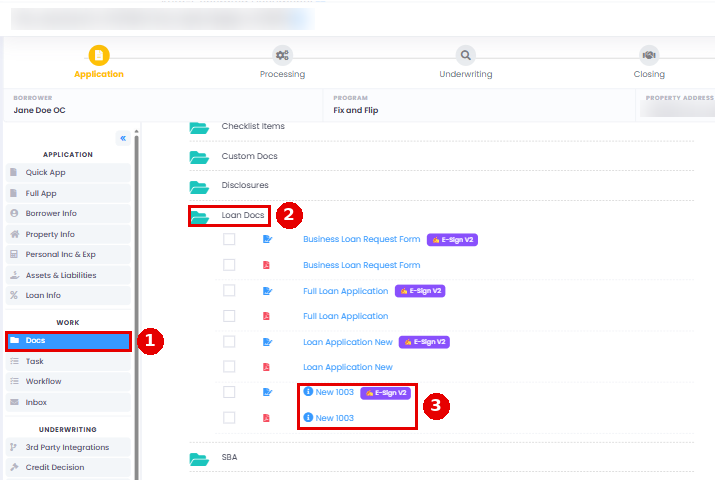
Where the 1003 lives on a loan file
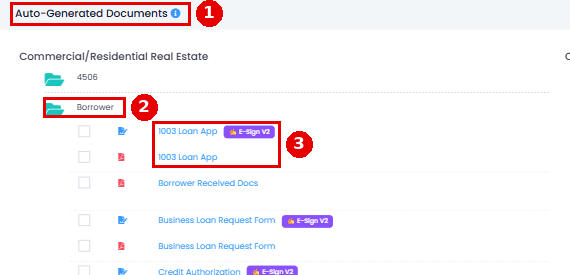
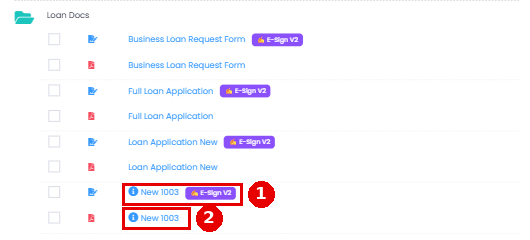
On the Docs tab under Auto-Generated Documents, 1003 Loan App (the previous application) is in the Borrower folder and New 1003 (the new application) is in the Loan Docs folder. Both have an E-Sign V2 version.
Sample New 1003 application.
Please note: bonus has been added to Commission/Bonus as a single field.
Questions? Email helpdesk@lendingwise.com.