![owl-Logo-1.png]](https://help.lendingwise.com/hs-fs/hubfs/owl-Logo-1.png?width=43&height=46&name=owl-Logo-1.png)
Navigate to Settings > Platform Settings > Doc Library > Click on "Display Field ID's" icon.
To build custom docs, we will need a pdf template with the placeholder/merge tags identified. Turn On the field IDs in order see the exact placeholder needed to populate on your custom templates, you will be using the clipboard icon 📋 to copy the field info for custom docs.
For the Doc Wizard tool and email templates, Turn On the field id's. You'll see icons next to each field within the loan file but the icon you want for email templates and doc wizard docs will be the scissors icon ✂️
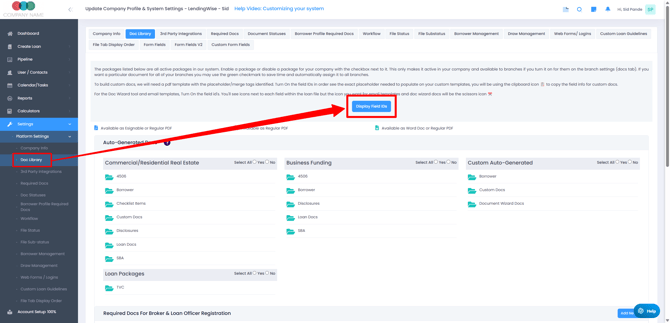
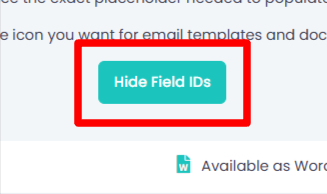
After clicking the blue "Display Field IDs" button it will switch to the button in the screenshot below.
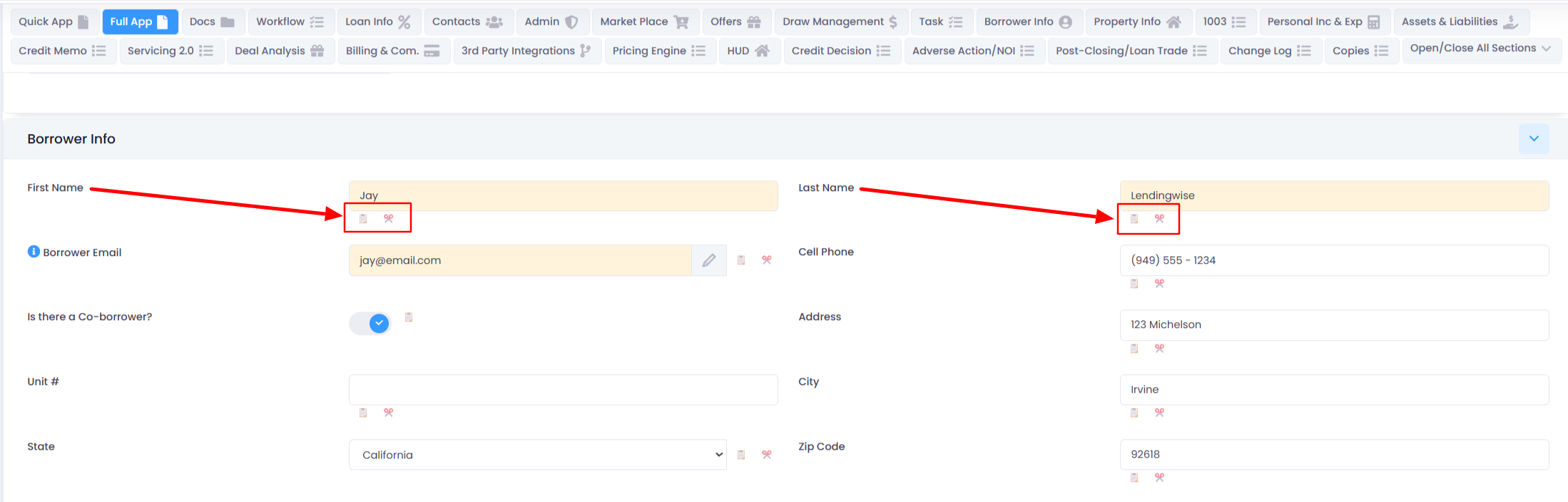
You should now see "Clipboard" and/or "Scissor" icons next to form fields be activated throughout the system.
The screenshot below is an example of what you will now see throughout the platform where form fields are visible.