![owl-Logo-1.png]](https://help.lendingwise.com/hs-fs/hubfs/owl-Logo-1.png?height=40&name=owl-Logo-1.png)
We have over 2,000 form fields in LendingWise which you can enable/disable. You can also rename fields or reuse
- Excel view of all fields: Click to display all the sections & fields available for your quick & full app. Make a copy of it and check the boxes accordingly for our onboarding team to make the configurations on your behalf. This is an optional resource, you/we can also work off sample loan apps you may have, or even edit the form fields settings right in the form fields editor tool.
- Webform with all fields enabled: This link allows you to visualize all the sections, fields, and field format to assist in configuring the field logic for the quick & full app
NOTE: Some of the form fields are conditional to other form fields (Ex. Annual Taxes, Total Loan Amount)
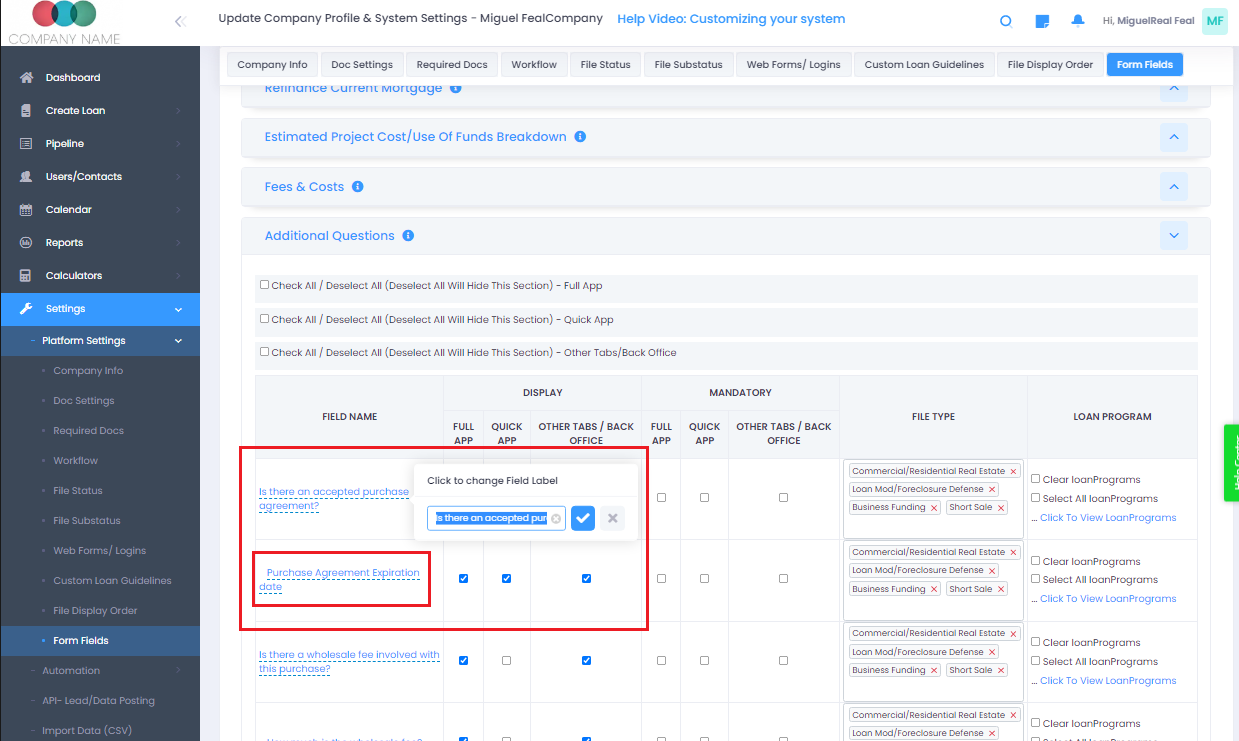
To customize a field:
-
Go To Settings ->
-
Platform Settings ->
-
Form Fields. Click on the form field and you will see the option to edit.
NOTE: Lendingwise can create additional custom fields please contact our team at helpdesk@lendingwise.com or Submit a Helpdesk Ticket for the best results.